Summary
Traffic Getting SEO Plugin™ will not work without the IonCube loader (which is free) so…
This process will show you how to enable (turn on) the IonCube loader on select cPanel web host providers.
This solution may not work at all web hosts, but it definitely works on thousands of them so most of you will be all set.
If you don’t want to mess around with the Ioncube loader problem at all…
Use these webhosts:
http://www.lunarpageshostingproviders.com/
http://www.hostgatorspecialoffer.com/
Or you can use these hosts and enable ioncube yourself in less than 1 minute:
Step-by-Step Process for Enabling IonCube Loader:
Step 1. Login to your cPanel.
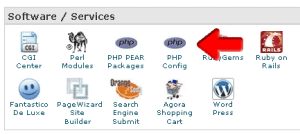
Step 2. Click on [PHP Config].
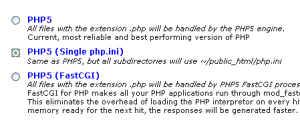
Step 3. Select [PHP5 (Single php.ini)] and then click [Save Changes].
Step 4. Check the box [IonCube] and then click [INSTALL PHP.INI MASTER FILE].
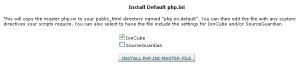
Step 5. At the bottom of the page, click [Go Back].

![]()
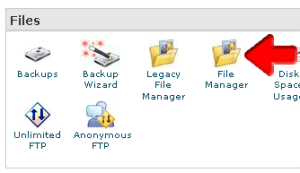
Step 6. Click on [File Manager].

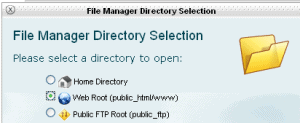
Step 7. Select [Web Root (public_html/www)] and click [Go].
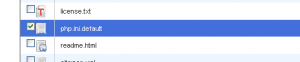
Step 8. Look for the file ‘php.ini.default’ and check the box to the left of it.
Step 9. Click [Rename] at the top of the page.
Step 10. Rename the ‘php.ini.default’ to ‘php.ini’ and click [Rename File].
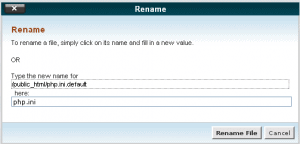
Step 11. You’ve successfully activated the ionCube loader for this web host.


Matt // Apr 7, 2009 at 11:45 pm
Bummer – This doesn’t work on godaddy servers? I can only set PHP4
Julie // Apr 8, 2009 at 11:51 am
I have a hostgator reseller account, but cant see the options above do I need to email them to turn it on?
Jeff Johnson says: You don’t need to do anything with hostgator.
That’s all covered in the Traffic Getting SEO Plugin tutorials.
CHeck them out here:
http://www.undergroundtraininglab.com/tgsp-install/
Simon Rosenberg // Apr 11, 2009 at 12:20 am
In GoDaddy log on to your GoDaddy account, select My Hosting Account from HOSTING drop down menu and click on Manage Account on the Hosting Account line under the Control Panel column. A separate browser window should open and under SETTINGS select the Extension drop down menu choice and select php5.x instead of php4.x and you will be using php5.3 Next locate the php.ini file in your route directory and FTP it to your computer. Edit the file by adding the suggested line:
zend_extension=//wp-content/plugins/seo-blog/ioncube/ioncube_loader_lin_5.2.so
before any other zend_extension lines
and save it to php5.ini and upload that file to your route director and then you should be able to activate the plugin and continue with the installation.
Simon Rosenberg
DrSimon at InternetDentalEnterprises.com
Simon Rosenberg // Apr 11, 2009 at 12:22 am
You need to put the extended file path of your route directory between the // in the above instructions
Michael // Mar 18, 2010 at 2:13 am
What exactly do you mean by the “extended file path of your route directory”.
If wordpress is installed in the route directory of http://www.mcgoodman.com, is that what goes between the // in the php.ini file when installing Jeff’s Free Traffic Plug-in?
Jeff Johnson // Mar 18, 2010 at 10:34 am
Please ask your host for the correct path…. they’ll know exactly what you need.
Brandon // Apr 11, 2009 at 4:49 pm
I have bluehost. Followed the directions, but it still isn’t recognizing. Saying “fatal error”.
Jeff Johnson says: Please contact bluehost for help.
Zach Waldman // Apr 17, 2009 at 6:53 pm
I tried to do everything you said to make it work with GoDaddy, but it’s still not working. Should the php5.ini file be put in the root of the site or the root of the wordpress directory? Also, can you give an example of the extended file path you say goes between the //? Thank you.
Jef Johnson says: Godaddy’s customer service will know exactly how to configure wordpress for their hosting accounts. Please consult with them.
Let them know the Traffic Getting SEO Plugin requires ioncube loader.
This is discussed here: http://www.undergroundtraininglab.com/tgsp-install/
Zach Waldman // Apr 24, 2009 at 8:31 am
I gave up on GoDaddy and moved to Host Gator. What a difference! Now my only problem is that when I click on the RSS feed, I get a 404 page not found error. It seems to be related to the plugin. Any ideas?
Jeff Johnson says: I doubt it’s the plugin itself.
Either your theme is introducing garbage in the rss feed url itslef, which happens all the time, or your htaccess file or permalink structures need adjusting.
Paul // May 14, 2009 at 9:30 pm
I have had no luck with blue host they cant seem to figure it out…Any suggestions anyone?
Jeff Johnson: Looks like blue host has made some changes since moving to php5.
Here’s what my guys say:
Please contact blue host if you need more help with this issue.
“I was just speaking with Mario about this and he said that he had called Blue Host and Blue Host changes the htaccess file when you set the settings of ionCube.
So what they would have to do, before doing the ionCube fix is save their blog’s original htaccess file, apply the ionCube fix, then overwrite the htaccess file with the original one you saved.”
Please contact blue host if you need more help with this issue.
max // May 20, 2009 at 4:30 pm
Wouldn’t it be 1000 times easier to just put this in a zip and let us use ftp to upload?
Jeff Johnson: Not sure what you mean…. Traffic Getting SEO Plugin is a zip file you upload via ftp.
Bill // May 22, 2009 at 7:44 pm
Installed your plugin, would love to use it. I am not a programmer so I’m not sure if the plugin caused this or not. On the home page the posts do not show anymore. I had it set for 3 posts to show in the 3 boxes below the featured area at the top. Any thoughts? Also youtube video seems to be slower loading
Jeff Johnson says: Plugin would have nothing to do with youtube videos in general.
It may be the theme you are using.
Gary Neame // May 23, 2009 at 5:45 pm
“Most Excellent Jeff”
The Host I used was most simple to do this.
First time doing this type of scripts and no problems this end…
Thanks man.
samuel iyinbo // May 24, 2009 at 12:58 am
I am working with my localhost on my computer for now (I normally like doing this for all my websites before I upload to my host) and I have been able to download wordpress and the Traffic-Getting SEO Plugin, however i would like to know if there is a way I can configure IonCube on my WAMP local host.
Jeff Johnson says: sorry, I have no idea since we deploy all websites on remote web servers..
samuel iyinbo // May 24, 2009 at 7:57 am
Meanwhile I’ve got my webhost to work on it and they have installed ioncube
Paul Livingston // May 26, 2009 at 7:24 pm
Why does the whole world think everybody uses cPanel?
I use Dreamhost (NO cpanel) and am getting this error message:
“…/wp-content/plugins/seo-blog/core.php requires the ionCube PHP Loader ioncube_loader_lin_5.2.so to be installed by the site administrator.”
Is there a way to fix it? (WITHOUT cpanel
) I use FTP.
Thanks.
Jeff Johnson says: The Traffic Getting SEO Plugin doesn’t require cpanel, but one of our tutorials show you how to use cpanel to fix it.
Just contact your hosting company and ask them to fix it for you.
They can view the ioncube tutorial here:
http://www.undergroundtraininglab.com/tgsp-install/
alex // May 27, 2009 at 7:12 pm
i use cpanel at hostmonster but i get a similar error:
“Site error: the file /home/thealex1/public_html/listbuildingproductsandservices/wp-content/plugins/seo-blog/core.php requires the ionCube PHP Loader ioncube_loader_lin_5.2.so to be installed by the site administrator.”
alex
Jeff Johnson says: Installation tutorials show you how to fix that issue… most won’t have it.
http://www.undergroundtraininglab.com/tgsp-install/
Jerel // May 27, 2009 at 7:37 pm
I tried to install but got this error.
Parse error: syntax error, unexpected ‘,’ in /home2/phillys1/public_html/phillyrehabproperties/blog/wp-content/plugins/seo-blog/core.php on line 70
can you advise? Thank you
Jeff Johnson: looks like an ioncube issue.
Please consult the tutorials here:
http://www.undergroundtraininglab.com/tgsp-install/
Or contact your hosting company for help
michael // May 27, 2009 at 8:16 pm
also how do we run that helper file thats in the ioncube folder?…..
Jeff Johnson: the helper file is standard that comes with ionCube. This may help more: http://www.ioncube.com/loader_installation.php
michael // May 27, 2009 at 8:26 pm
OK been on the phone with godaddy for over an hour and half and they still couldn’t help me out. . .
Let me share with you my trial and Fatal Error steps. . . uploaded plugin
went to php.ini and changed it to php5.ini in the root domain….
installed that code above in that file –
zend_extension=//wp-content/plugins/seo-blog/ioncube/ioncube_loader_lin_5.2.so
- in a variety of ways to test
/usr/local/
rootdomain.com/directoryofblog/
/rootdomain.com/directoryofblog/
even 5.0 (at the end)
Please advise, , , taking a step outside for a moment….
Jeff Johnson: Leave godaddy
Seriously, I love them for domains but hate them for hosting.
Nothing we can do that they haven’t already tried, sorry.
Rik // Nov 24, 2009 at 8:14 am
You might want to tell people up front that this DOES NOT WORK WITH GODADDY… Is that really all we can do is leave GODADDY to fix this???
Jeff Johnson: Actually, it does work with godaddy. Several people have reported a “fix’ for it here on the blog. Please contact godaddy and see what they can do to configure it for you.
Terry // May 28, 2009 at 12:01 am
Hey Jeff, I am having the same prob as everyone else. The post that #15 said is exactly whats up with me,though I don’t have the ‘php,ini,default’ file in my file manager or do I have the (Single php.ini)] in the php config main. It installed but can’t activate it and have watched the /tgsp-install/ still not able to do so,I am trying it on an existing blog,have wp 2.7 already updated,have 5.2 php version,c-panel accelerated, is there a fix or another tutorial on this plugin?
It seems like some awesome software to use if I could get it to work and would like to thank you again for your hard work man.
I like when it’s simple to do!
Jeff says: Here what my guys say: “If you are using the Single php.ini configuration you have to make sure that there is a php.ini file in the root of your web host (public_html). Then that file would have to have the ionCube loader paths in them. cPanel web hosts should be able to create the php.ini details for you. Typically the line in the php.ini file you are looking for is:
zend_extension = /path/to/ioncube_loader_lin_5.2.so ~Anthony”
michael // May 28, 2009 at 1:30 am
That’s the thing they didn’t help me with anything?. . . besides they didn’t know either. . . I guess that’s your point. . . anyways, what does it take to transfer 22+ domains with blogs that rank on them already?
So nobody out there had a successful go daddy install?
Jeff Johnson: they can be moved but it will be work.
I’d just leave them and start using the traffic getting seo plugin on new blogs on a different host.
michael // May 28, 2009 at 3:37 am
http://forum.ioncube.com/viewtopic.php?t=1481&postdays=0&postorder=asc&start=0
GOT IT BABY – - – Persistence & Determination prevails!
Activated – now my only question is how I can use that path that’s used in the php5.ini for multiple blogs? will it work, etc? Or have to put the absolute path in the php5.ini for every blog I install it in?
Yes, you can use a single php.ini file for all blogs on your web host, just make sure your web host supports this feature.
Rod // May 28, 2009 at 8:10 am
Hi
Sometimes you have to copy php.ini into all the directories that use ioncube loader, I just copied into all folders and it works as for blue host this works too.
Tim // May 28, 2009 at 11:29 am
I use BlueHost. Before renaming “php.ini.default” file I first renamed the already present “php.ini” file to “php.ini.orig” just to save it in case I needed to reverse. Then renamed “php.ini.default” to “php.ini”. Tried activating plugin and it worked fine. Thanks.
Black Hat Software // May 28, 2009 at 1:33 pm
Why does this require the ION Cube Loader? What needs to be encrypted?
I have a hard time understanding Free Software with encrypted files. It tells me there is something going on that shouldn’t be.
I am interested in trying this Plugin, but would like to know the real deal before I do.
Thanks.
Mike
Jeff Johnson: It is encrypted to protect my intellectual property, that’s all.
I spend tens of thousands developing my free software, maintaining it, and giving away free content for my visitors.
Nothing funny going on, just protecting my work.
Nahyan // May 28, 2009 at 3:51 pm
i just activated the plugin on bluehost account.
what happens now?
as in what difference would i see now or improvements etc.
i’m a complete noob to wordpress so any comments would be helpful
Nahyan
Jeff Johnson says: Just create keyword rich content and post it to the blog to attract the search engines… the blog and the software do everything else.
Tranque fuller // May 28, 2009 at 9:22 pm
What if I wasn’t smart enough to do what poster #23 did and rename the php.ini.default. I simply followed the intructions you gave us only to discover after the act that there was an issue with Bluehost. Has the now renamed file (php.ini) been changed? What do I do now?
I would just reapply the Ioncube settings again to the php.ini as outlined in the tutorial and then make sure to rename the php.ini.default to php.ini.
It may help to contact Bluehost for more assistance, if they’re still having issues. It’s a relatively easy fix for Bluehost.
Ryan // May 28, 2009 at 9:47 pm
I had bluehost install this for me and here is the error I keep getting.
Site error: the file /home1/acnesecr/public_html/officialclepstudyguides/wp-content/plugins/seo-blog/core.php requires the ionCube PHP Loader ioncube_loader_lin_5.2.so to be installed by the site administrator.
What should I do?
Jeff Johnson says: Bluehost made some changes recently to their php software that is causing some issues.
Have them fix the ioncube issue as detailed in the training material
http://www.undergroundtraininglab.com/tgsp-install/
Tamaki // May 29, 2009 at 1:25 am
Hi, I use GoDaddy.com for hosting. After struggling all evening to resolve errors, I think now I have the php5.ini file ok. However, just got the following error. Could anyone help me?
Warning: in_array() [function.in-array]: Wrong datatype for second argument in /home/content/u/u/c/uucat/html/mypastlifestories/wp-admin/includes/plugin.php on line 268
Warning: Cannot modify header information – headers already sent by (output started at /home/content/u/u/c/uucat/html/mypastlifestories/wp-admin/includes/plugin.php:268) in /home/content/u/u/c/uucat/html/mypastlifestories/wp-includes/pluggable.php on line 850
Dave Yates // Jun 3, 2009 at 1:22 am
Dang Jeff… Those instructions were PERFECT.
Thanks a million!
Dave
Dennis King // Jun 3, 2009 at 2:41 pm
Does anyone have any experience with a WP blog hosted by Network Solutions. It’s tough not having the c-panel to work from
Gengis // Jun 3, 2009 at 6:46 pm
Hey everybody – it worked fine with EarYourWay.com
Thanks for the input
Gengis
Morpheus // Jun 3, 2009 at 11:58 pm
Followed you’re instructions with BlueHost, still get fatal error.
No-go.
Thanks anyway.
Jeff Johnson: They changed their software recently and it’s causing a few issues. Please have them look at it for you.
Lee // Jun 4, 2009 at 6:11 am
Bluehost error fix:
Make sure you are using PHP5 (Single php.ini)
Added the following to php.ini:
[Zend]
zend_extension=/path/to/ioncube/ioncube_loader_lin_5.2.so
zend_extension_ts=/path/to/ioncube/ioncube_loader_lin_5.2_ts.so
Every addon domain will need the .htaccess file copied to is folder. You will need to modify the .htaccess and remove the lines:
# Use PHP5 Single php.ini as default
AddHandler application/x-httpd-php5s .php
*** Do no remove those lines from the .htaccess in your public_html folder ***
This is what worked for me after 4 days of trying to get this to work!
Jeff Johnson: My advice is to never spend 4 days on anything tech related… just let your host solve the issue or move on. Believe me, I’ve been there and that’s the best advice I can give you.
Here’s what my guy says about bluehost’s recent issues with TGSP “I’ve seen this fix before. Newer accounts are strictly PHP5 for the ionCube, but you have to manually enable PHP 5 by adding that 1 line to the htaccess file. I haven’t been able to focus in on exactly what web hosts and/or packages and/or time of purchase this would be the case with.”
That pretty much means bluehost has to fix it for you… or I’d simply suggest using it on another host like hostgator.
Sorry, wish we coluld help more!
Lee // Jun 4, 2009 at 11:14 am
Hey Jeff … I let them deal with. It took a few of their guys, but they figured it out. My comment was detailing what they did to fix it. Hopefully it helps others out.
Also, I have been with bluehost for 4 years, so the problem is not only on new accts there.
Andre cummins // Jun 5, 2009 at 8:32 pm
So where do I find this wordpress 2.7
http://wordpress.org/
Tamaki // Jun 7, 2009 at 3:30 pm
Hi. Since I didn’t get any help for my GoDaddy errors, I signed up with Just Host. It turned out that they already had IonCube loader pre-installed and the SEO Plugin installation was a snap. What a difference!!! Thank you.
Natasha // Jun 10, 2009 at 9:04 pm
Thanks! The instructions worked perfectly with my hostmonster account.
Lisa // Jun 11, 2009 at 7:07 pm
Hi Jeff,
Thanks so much for all of this. I use hostmonster and when I got the error, I typed into the chat, and got some legal mumbo jumbo, so I called the toll-free number and tada…the techie guy he fix it all up. Yeah, so now I will write a keyword rich post and hopefully people will come and see my blog which would be really cool. Thank you for all you do for us. You go out of your way and help us in every way you can. Seeing you respond to all the issues people have had with the cough…crummy service ….G…,cough Da…cough. makes me laugh. Hostmonster makes them pale in comparison. Even Hostgator fails to meet their standards. I am hopeful that someday, I’ll be rich and famous and be able to afford Joel at Kiosk.ws, but until then I’m a Hostmonster fan for sure.
alechko // Jun 12, 2009 at 10:51 am
This doesn’t work on Fatcow servers? can anyone help ?
Thanks
Mike Snyder // Jun 26, 2009 at 4:04 am
Just a heads up…
I have my main website hosted on Yahoo!
Yahoo is usually pretty good, but not as good as Hostgator.
I spent about 20 hours trying to update my WordPress blog and install Jeff Johnson’s SEO Plugin.
I finally gave up in frustration. I emailed Yahoo! customer service and told them to install my “Ioncube loader” Right NOW, OR ELSE!!!
They replied:
“Thank you for contacting Yahoo! Small Business Support. I realize you would like to enable IonCube Loader on your Yahoo! Web
hosting front. Unfortunately this feature is not available with Yahoo! as we run on php 4.1 and IonCube works on php 5.0″
Anyone using Yahoo.com for their website hosting cannot use the Jeff Johnson SEO Wordpress Plugin. Hopefully I can use it next year
Jeff Johnson: Just a reminder… never spend this much time trying to fix anything hosting related… just contact your hosting company and ask for help
Ron // Jul 2, 2009 at 7:56 pm
I installed the plugin on 4 sites on one account at Bluehost. I had trouble with each one and had to get help tweaking something to get them to work.
One of the sites will not let the featured content gallery display if I have the seo plugin activated (it works if I deactivate the seo). I have another site with the same theme and it works. Bluehost says it isn’t there problem.
Any ideas?
Jeff Johnson: No way to tell what is causing it. If the featured content gallery is a plugin, you could try deactivating the setting “WordPress should correct invalidly nested XHTML automatically ”
You’ll find it under “Settings/Writing”.
WP checks it by default but it does cause issues now and then.
Ron // Jul 3, 2009 at 12:09 pm
That was already deactivated – tried it both ways but no change. This is kinda strange and frustrating – 2 plugins on 2 sites with same theme on same server account, one doesn’t work and the other does.
If I install all the recommended plugins on the site with the problem (without your plugin activated) will I get the same results?
Jeff Johnson: No, installing the individual plugins will not give the same results since we pre-configure them during our initial configurations and we have other tweaks.
But that doesn’t mean you shouldn’t install them, it will just be different.
Ron // Jul 3, 2009 at 5:43 pm
I might have a clue to the problem. The site that works is WP2.7.1 and the one that doesn’t is 2.8.
Can you be more specific about what the plugin will or won’t do with the other plugins? Is it worth uninstalling 2.8 and reinstalling 2.7.1 to see if that solves the problem? Anyone else have a problem with the gallery plugin?
Jeff Johnson: I’m sorry but the best I can say is “try it”.
Traffic Getting SEO Plugin has been 2.8 ready long before 2.8 was released. Just make sure you download the newest version.
However, some of the plugins that TGSP installs have not been certified 2.8 compatible so they may cause issues themselves.
The best you can do is trial and error… unistall or deactivate and then reactivate each one… one by one.
Tavi // Jul 7, 2009 at 7:38 pm
Hi Jeff,
Just one question for you. I have a hosting account at Host Gator but when i try to install ionCube for traffic getting seo plugin i see another screenshot I don`t appears me the exact screenshots that you have published here.
How I most do to install IonCube loader?
Jeff Johnson: The tutorials should work fine. If not, please contact hostgator and they’ll be glad to help.
However, I don’t think hostgator even needs the ioncube loader fix… but I could be wrong.
David Bates // Jul 10, 2009 at 6:21 am
I run the above site via Vodahost.com and FANTASTICO only allows you to add Wordpress 2.5. I need to know how to load Wordpress 2.8 and add the Traffic getting seo plug etc……Step by step would be good. Vodahost on PHP CONfIG say adminstrator has to amend but control panel shows they are using PHP 5.2 something I am a bit of a novice at this
Jeff Johnson: Here are the installation instructions, they should help: http://www.undergroundtraininglab.com/tgsp-install/
Michael walrath // Jul 19, 2009 at 2:59 pm
ixwebhosting.com has .php5 but you need to get their support to set up the php ini. I have it set up on three of my blogs and it works great.
Adam // Jul 20, 2009 at 8:32 pm
Jeff – I have some other sites using php5 being hosted so I am worried that changing to php.ini will affect them.
Once ioncube is installed, is it possible to revert back to php5 again?
Jeff Johnson: The best place to get that answer is directly from your hosting account since they are the ones being affected.
Laura Gullett // Jul 21, 2009 at 5:15 pm
GoDaddy refuses to help me fix the error saying they will not support a third party plugin. I put the code below in the ini and changed it to php5.ini as instructed in the comments. I already have my site prepaid and do not have money to go to another hosting provider. Instead I really prefer for it to work properly in my Godaddy server.
I now have Wordpress 2.8 upgrade.
zend_extension=//wp-content/plugins/seo-blog/ioncube/ioncube_loader_lin_5.2.so
Please help me fix it asap. I would be so grateful. I’m sure there is a fix that does work on the GoDaddy server. I am technically savvy being involved in building, configuring, etc since the early DOS days. Please be technically blunt in the solution. I appreciate it very much.
Laura
Laura Gullett // Jul 21, 2009 at 5:17 pm
Sorry I’m sure you saw the error before but here it is again.
Thanks for your help,
Laura
———————-
Plugin could not be activated because it triggered a fatal error.
Site error: the file /home/content/l/g/u/lgullett/html/apps/wordpress/wp-content/plugins/seo-blog/core.php requires the ionCube PHP Loader ioncube_loader_lin_5.2.so to be installed by the site administrator.
Laura Gullett // Jul 21, 2009 at 6:53 pm
I fixed it using this code with my server info which I forgot to edit in before. YEAH!
Thank you all so very much.
Laura
zend_extension=/home/content/l/g/u/lgullett/html/apps/wordpress/wp-content/plugins/seo-blog/ioncube/ioncube_loader_lin_5.2.so
[Zend]
zend_extension=/usr/local
/zo/ZendExtensionManager.so
zend_extension=/usr/local/zo/4_3/ZendOptimizer.so
Adam // Jul 27, 2009 at 12:53 pm
Great walk through guide, it worked a treat on bluehost, took just under a minute to implement.
Nick // Jul 27, 2009 at 3:47 pm
Now that I have the IonCube working for my hostmonster account, do I need to have the “plugins/ioncube” folder in each of my blogs?
I have installed jeff’s plugin and activated each of the suggested plugins, but I noticed that the ioncube folder was only installed in only one of the 3 blogs that I created in this hosting account. Do I need to copy the ioncube folder into each blog.
Jeff Johnson: That depends on your hosting account. Some yes, some no. YOu’ll have to check with them.
Hannah // Aug 8, 2009 at 9:13 am
This was so helpful. It made it easy for me to enable ioncube on hostmonster. The instructions were very clear. Thanks heaps!
Dan // Aug 14, 2009 at 4:15 pm
Installed everything on go daddy. Here is a link to how to do it –
http://forum.ioncube.com/viewtopic.php?p=4326#4326
Very simple, takes an extra 2 minutes.
Just did a search for “ioncube loader godaddy”
If it doesn’t work for you hoster try the same but just change godaddy to whatever your hosting account is.
Walter // Aug 31, 2009 at 8:21 pm
I’m having a devil of a time getting the TG plugin to work on my latest blog on 1and1 hosting.
When the plugin is enable then the only thing visible in my dashboard is Jeff’s link. Disable it and I have the full panel back.
1and1’s tech support asked me to find out this:
What is the version of ioncube that is most compatible w/the plugin?
Thanks. Btw, how lunarpages help and tech support?
Jeff Johnson:
Here’s what has worked for us in the past: “it appears that upgrading to PHP5 fixes this issue because of the way Wordpress executes certain functions that are semi-restricted with PHP4 on 1and1 web hosts. “
wwdynt // Sep 9, 2009 at 4:46 am
I have 2 sites at Hostmonster using TG plugin. But I only succeed with one site at Bluehost. The second site generate error as if the ioncube is not loaded. Try to reinstall wth the help of support, but so far the error still appear. What should I do?
Jeff Johnson: Ioncube is a server side issue. If the sites are on different servers at bluehost they may have different versions of php installed. Have them upgrade both servers to the version of PHP that works (5 is what our servers use).
If that doesn’t work please ask them to review our ioncube tutorials on this site.
http://www.undergroundtraininglab.com/ioncube/
Mubashar Abrar // Oct 10, 2009 at 4:15 pm
I am using netfirms as the hosting service could you please tell me a bit about how to do this properly in there. I have been looking about how to do it without any success even couldn’t google the stuff. I get the following message when I open the plugin:
Fatal error: Call to undefined function gregoriantojd() in /mnt/w0910/d19/s26/b0309d4c/www/anatomyspot.com/wp-content/plugins/seo-blog/ext-lib.php on line 0
please help!
Jeff Johnson: The best thing to do is ask your hosting company for help since each one is different, and they would know more about it than anyone.
martin // Oct 24, 2009 at 9:19 pm
Hi there i have tried for hours to upload to wordpress.org and get this message
The uploaded file could not be moved to /home1/martins8/public_html/wp-content/uploads/2009/10.
Use Bluehost so enabled the ioncube loader as per your very good instructions – but same messaage
Help please
Thanks very much in anticipation
Jeff Johnson: You have to host the blog on your own domain. Please follow the directions in the tutorials.
Dennis // Nov 8, 2009 at 7:50 am
since installing your Traffic Getting SEO Plugin the Tweet My Blog plugin doesnt automatically add the post to my Twitter account.
Any ideas
Jeff Johnson: The best advice I can give is either contact the tweet my blog developer and see if there are any known issues with other plugings, or Try deactivating all the plugins and then reactivate them one by one until you find the one that causes the issue with the tweet plugin.
Derek // Nov 8, 2009 at 6:12 pm
Regarding GODADDY…
I simply folllowed the instructions below for Enabling Ioncube and this works fine on Godaddy shared servers:
http://help.godaddy.com/article/5608?
Hope it helps you.
Kristen // Nov 24, 2009 at 8:26 pm
Users on the (mt) Media Temple gridserver will be able to use this article to quickly load up ioncube libraries. Worked like a charm for me:
http://kb.mediatemple.net/questions/144/How+can+I+install+IonCube+loader+libraries+on+the+%28gs%29+Grid-Service%3F
Miodrag Milenkovic // Feb 8, 2010 at 5:22 am
Your RSS feed doesn’t work in my browser (google chrome) how can I fix it?
Jeff Johnson // Feb 9, 2010 at 12:34 pm
That’s kind of funny considering my feed is by feedburner, which is owned by google. Sorry, but i’ve never used Chrome so I don’t know how to fix it.